Pyspider
pyspider的安装和启动
一、架构 pyspider的架构主要分为 scheduler(调度器), fetcher(抓取器), processor(脚本执行):
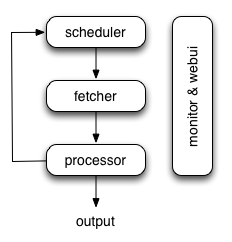
- 各个组件间使用消息队列连接,除了scheduler是单点的,fetcher 和 processor 都是可以多实例分布式部署的。 scheduler 负责整体的调度控制
- 任务由 scheduler 发起调度,fetcher 抓取网页内容, processor 执行预先编写的python脚本,输出结果或产生新的提链任务(发往 scheduler),形成闭环。
- 每个脚本可以灵活使用各种python库对页面进行解析,使用框架API控制下一步抓取动作,通过设置回调控制解析动作。
二、安装
1、安装辅助包
1 | $sudo apt-get install python python-dev python-distribute python-pip \ libcurl4-openssl-dev libxml2-dev libxslt1-dev python-lxml
|
2、phantomjs
1 2 3 4 5 6 | $cd /usr/local/share
$sudo wget https://phantomjs.googlecode.com/files/phantomjs-1.9.0-linux-x86_64.tar.bz2
$sudo tar xjf phantomjs-1.9.0-linux-x86_64.tar.bz2
$sudo ln -s /usr/local/share/phantomjs-1.9.0-linux-x86_64/bin/phantomjs /usr/local/bin/phantomjs
$sudo ln -s /usr/local/share/phantomjs-1.9.0-linux-x86_64/bin/phantomjs /usr/bin/phantomjs
$phantomjs -v
|
3、安装pyspider
1 2 3 | $sudo apt-get install libssl-dev #否则,会保持fatal error: openssl/crypto.h: No such file or directory,找不到头文件
$pip install pyspider
$sudo ln -s /home/apdep/.local/bin/pyspider /usr/bin/pyspider #这样才能在cmd中直接执行pyspider
|
4、查看安装路径:
1 2 3 | $ pip show --files pyspider
Location: /home/apdep/.local/lib/python2.7/site-packages
/home/apdep/.local/bin/pyspider
|
三、运行pyspider
$~/.local/bin/pyspider #默认执行$pyspider all,此时,所有组件以subprocess的形式运行;而在分布式部署时,one component in one process
运行此命令后显示:
Web server running on port 25555 webui running on 0.0.0.0:5000
2、访问web ui visit http://localhost:5000/
3、查看帮助 $pyspider –help
pyspider的webUI创建爬虫
一、参考链接
http://cuiqingcai.com/2652.html
二、要点
1、webUI界面功能介绍 2、可以在on_start()中建立多个crawl base url
找出是哪个js代码请求了数据
场景: 用pyspider抓取网页时,如果网页中有的数据是通过AJAX请求的,那么如果不执行这些js,页面中出现空白。但是,有那么多js,到底是哪个js请求了我们需要的数据呢?
答案:http://docs.pyspider.org/en/latest/tutorial/AJAX-and-more-HTTP/#ajax
HTTP 599 error
在抓取澳大利亚人报的category时,pyspider报了如下的错误:
HTTPError: HTTP 599: Maximum (5) redirects followed
显示这个错误的源代码在如下链接:
https://github.com/binux/pyspider/blob/master/pyspider/fetcher/tornado_fetcher.py
从源代码中我们可以看出在连续收到了5次的,(301, 302, 303, 307)后,就会报这个错
webUI加载太慢
F12发现是cdn加载不了,这个问题以前也有人遇到过,作者已经给出了答案
1 2 3 4 5 | {
"webui": {
"cdn": "//cdnjs.cloudflare.com/ajax/libs/"
}
}
|
从命令行启动pyspider
官方文档:http://docs.pyspider.org/en/latest/Command-Line/
一、总命令
$pyspider [OPTIONS] COMMAND [ARGS]
     [OPTIONS] :global options work for all subcommands.
     COMMAND: all, one,  bench, scheduler, phantomjs, fetcher, processor,  result_worker, webui,
     [ARGS]: 针对每个COMMAND,没有不同参数
二、逐个component启动
1、fetcher
当要和phantomjs配合使用时,启动fetcher的命令是: $pyspider –phantomjs-proxy=”localhost:25555” fetcher (参考:http://docs.pyspider.org/en/latest/Deployment/)
2、bench
projectdb, taskdb, resultdb虽然使用了默认的sqlite,但是,数据库文件还是要存盘的,不然状态无法保存。 除非Run Benchmark test. In bench mode, in-memory sqlite database is used instead of on-disk sqlite database.
pyspider的分布式部署
http://docs.pyspider.org/en/latest/Deployment/
核心思想:用command line在不同的机器上起动不同的component