Celery
安装
安装Celery 用pip或easy_install安装:
$ sudo pip install Celery 或着:
$ sudo easy_install Celery
使用Redis作为Broker时,再安装一个celery-with-redis。
异步发送email
1 2 3 4 5 6 7 8 9 10 11 12 13 | '''
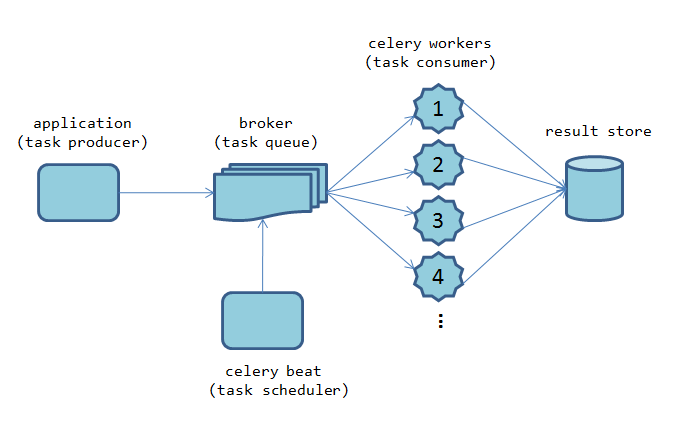
tasks.py,对应架构图中的"celery workers"
'''
import time
from celery import Celery
celery = Celery('tasks', broker='redis://localhost:6379/0')
@celery.task
def sendmail(mail):
print('sending mail to %s...' % mail['to'])
time.sleep(2.0)
print('mail sent.')
|
1 2 3 | #启动worker:-A APP, --app=APP, app instance to use (e.g. module.attr_name)
#本例子找那个,-A直接使用了module name
$ celery -A tasks worker --loglevel=info
|
1 2 3 4 5 6 7 8 | '''
application.py,对应架构图中的"task producer"
'''
from tasks import sendmail
if __name__ == '__main__':
#显示地调用任务,发送任务处理请求到任务队列.
#显然celery封装了向broker发送消息的接口。
sendmail.delay(dict(to='celery@python.org'))
|